How to Use Broker Rankings to Choose the Right Partner
See which brokers charge the highest fees, pay detention reliably, and have the best payment history. Community-powered broker data helps you pick the right partner every time.
Why Broker Rankings Matter
Not all brokers are created equal. Some charge fair fees (5-7%) and pay detention without a fight. Others take 12-15%, hide fees, and drag their feet on payment. TruckerProfit's Broker Ranking consolidates your personal experience with anonymous community data so you know — before you accept a load — whether the broker is a good partner or a toxic one. The difference between a 'good' broker and a 'toxic' broker can be $5,000-10,000/year.
- 1Navigate to Broker Fee Killer → Broker Ranking
- 2Your personal broker history appears automatically as you upload rate confirmations
- 3Community data from the Shared Broker Pool enriches each broker's profile
Reading the Broker Ranking Table
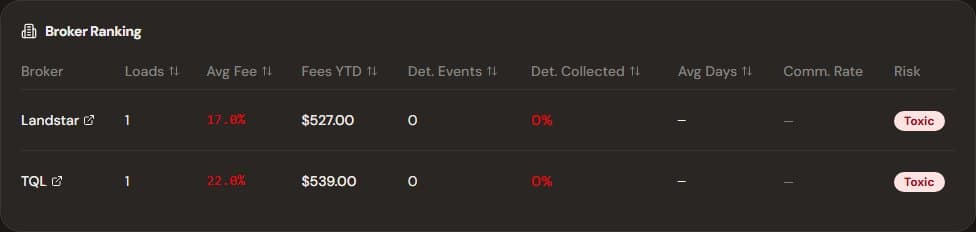
Red = toxic broker. Avoid or negotiate harder.
- 1The table shows every broker you've worked with, sorted by risk rating (Good → Fair → Poor → Toxic)
- 2Columns: Broker Name, Loads Run, Avg Broker Fee, Collected Fees/Year, Avg Detention Rate, Payment Speed, Risk Rating
- 3Green = Good (low fees, fast payment, fair detention). Red = Toxic (high fees, slow pay, disputes claims)
- 4Click any broker to see their full profile: all load history, fee trends over time, and community notes
Pro Tip
Focus your volume on brokers rated 'Good' — they're your partners. Use 'Fair' brokers selectively. Avoid 'Toxic' brokers unless no other option exists.
Shared Broker Pool — Community Intelligence
- 1The Shared Broker Pool aggregates data from all TruckerProfit users anonymously
- 2For each broker, you see: community average broker fee, detention pay rate, free hours offered, and claim payment rate (% of claims paid)
- 3If a broker has a 90%+ claim payment rate from the community, you know they pay — file with confidence
- 4If the community shows 60% payment rate and most users report disputes, factor that into your rate negotiation
Warning
Community data is anonymized and aggregated — individual experiences may vary. Use it as a signal, not a verdict. A 'Fair' broker may become 'Good' with consistent volume and professional communication.
Using Rankings in Negotiations
- 1When a broker quotes a rate, check their ranking first — a 'Toxic' broker needs to offer 10-15% above market to compensate for the risk
- 2Use the broker's own history against them: 'I see your average broker fee across my last 8 loads is 11%. Can we bring that to 8% going forward?'
- 3For detention: 'The shared pool shows your standard rate is $45/hr. Can we put that in the rate confirmation?'
- 4Brokers who know you track their performance tend to behave better — mention TruckerProfit casually: 'My system flags anything over 10%.'
How TruckerProfit Helps
- 1Broker Ranking auto-builds as you upload rate confirmations — no manual data entry needed
- 2Community data from the Shared Broker Pool shows you how other carriers experience the same broker
- 3Fee Trend Chart visualizes each broker's fee percentage over time — spot patterns before they cost you
- 4Risk ratings (Good/Fair/Poor/Toxic) give you a clear, actionable signal before every load decision