How to Compare Truck Insurance Policies Side by Side
Upload multiple insurance policies to TruckerProfit and compare coverage, premiums, deductibles, and exclusions side by side. Find the best policy for your operation.
Why Comparing Policies Matters
Most owner-operators compare insurance once — when they first get their authority — and auto-renew forever. But insurance rates change every year, and a policy that was competitive last year might be $200-400/month more expensive now. Side-by-side comparison reveals: which policy has the best coverage-to-premium ratio, where one policy covers something another excludes, and exactly how much you'd save by switching.
- 1Gather your current declarations page (dec page) or ACORD certificate
- 2Request quotes from 3-5 specialty trucking insurers with identical coverages
- 3Open TruckerProfit Insurance Auditor → Compare Policies
Step 1: Upload Policies for Comparison
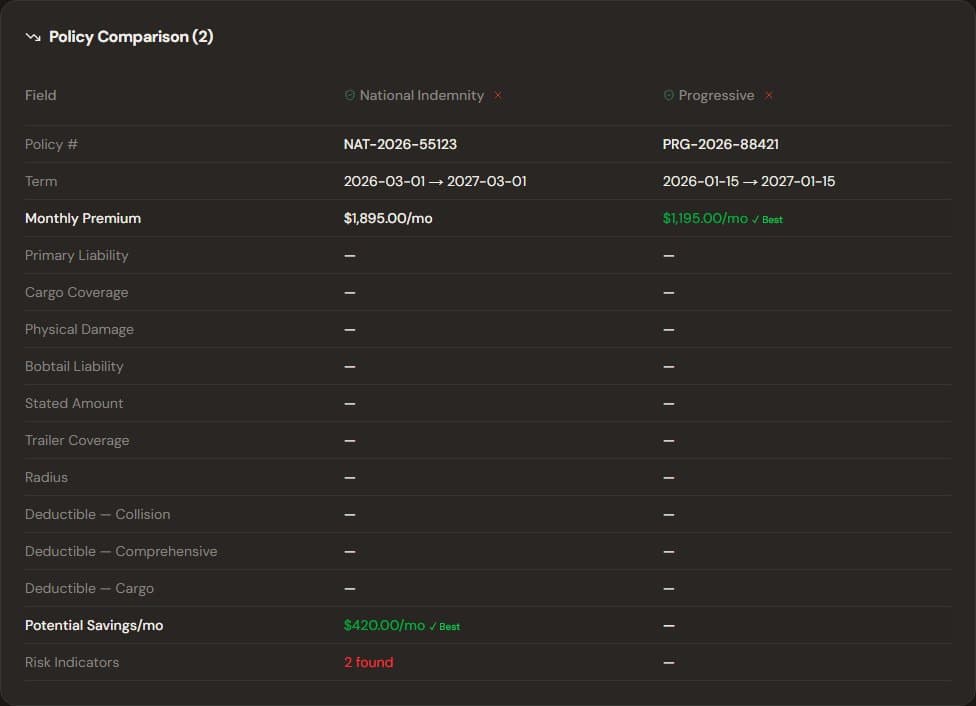
Compare up to 5 insurance policies side by side
- 1Click 'Add Policy' and upload your current policy document (PDF or photo)
- 2Add each quote you received — upload the quote documents one by one
- 3Name each policy for easy identification: 'Current - Progressive', 'Quote 1 - Great West', 'Quote 2 - Northland'
- 4Upload up to 5 policies for a single comparison
Step 2: AI Extracts Key Data
- 1TruckerProfit's AI reads each policy and extracts: premium amount, primary liability limit, cargo coverage, physical damage type, deductibles, radius of operation, and key exclusions
- 2The system normalizes all policies to the same format for direct comparison
- 3If AI can't read a field, you can enter it manually
Step 3: Side-by-Side Comparison Table
- 1The comparison view shows all policies in a table: policy name, term dates, monthly premium, liability limit, cargo coverage, physical damage, deductibles, and exclusion warnings
- 2The best value option is highlighted with a green badge — this factors in both premium and coverage quality
- 3Exclusion warnings appear in red: 'Quote 2 excludes non-owned trailer' — a critical gap
- 4Use the checkboxes to select policies and compare any subset side by side
Pro Tip
Look beyond the premium — a policy that's $50/month cheaper but excludes hired auto coverage could cost you $20,000 if you ever rent a trailer.
Step 4: Make Your Decision
- 1Based on the comparison, decide: stay with current (if competitive), switch to a better quote, or negotiate with your current agent using the AI-generated letter
- 2If you decide to switch, the system helps with: cancellation notice, effective date coordination, and proof of new coverage for your brokers
- 3If you stay, use the comparison as leverage: 'My current premium is $X. I have a quote for $Y with better coverage. Can you match it?'
Warning
Never cancel your current policy before the new one is bound and effective. A lapse in coverage can increase your premium by 30-50% for the next 3 years.
How TruckerProfit Helps
- 1Upload multiple policies — AI extracts and normalizes every coverage detail in seconds
- 2Side-by-side comparison table highlights the best-value option and flags dangerous exclusion gaps
- 3Premium trend chart shows how your rates have changed over time — useful leverage in negotiations
- 4The AI generates a professional letter to your current agent with specific price-match requests based on real competing quotes